Your React Project Starts Clean. Six Months Later, Nobody Wants to Touch It. Here's Why.
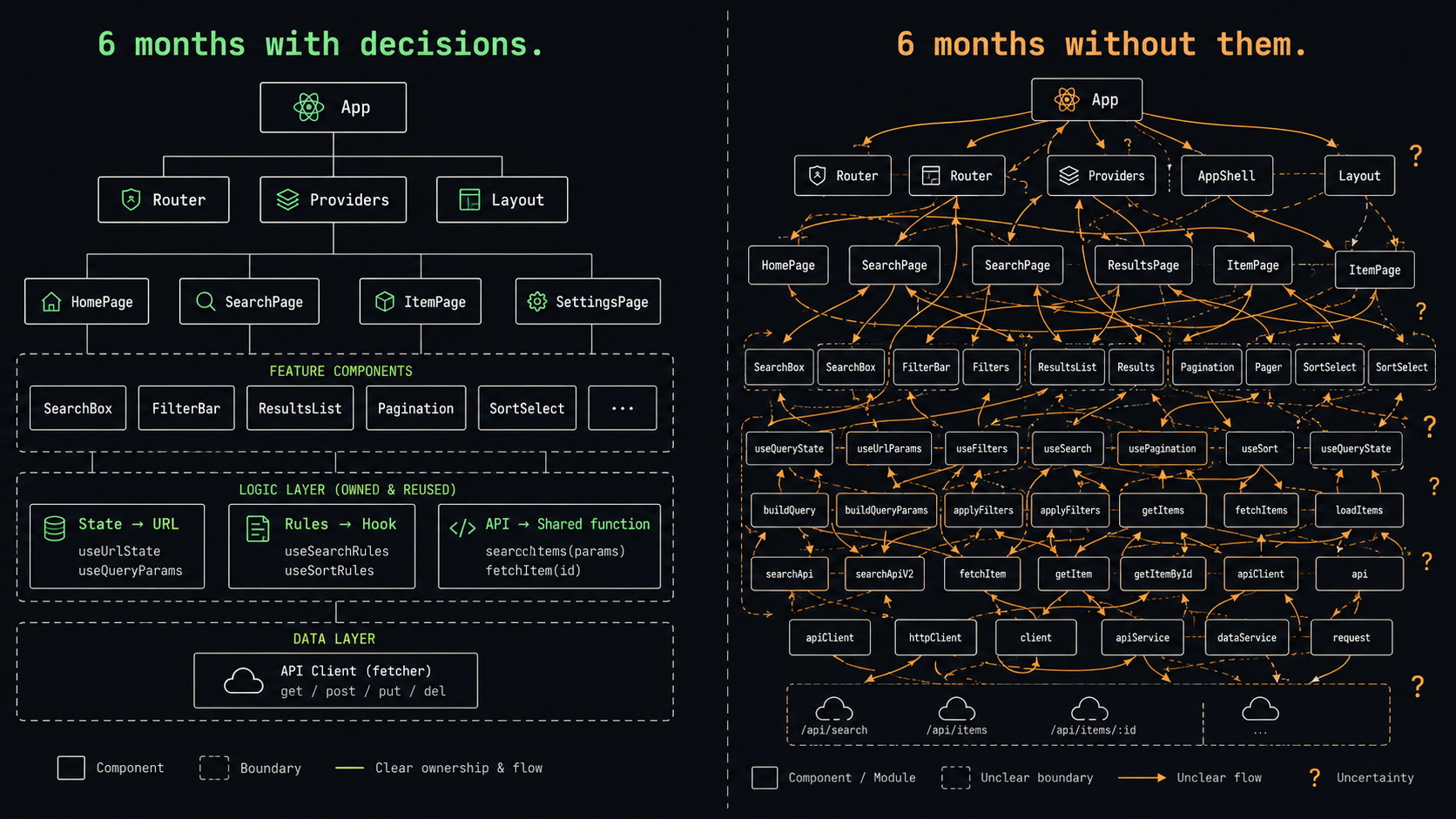
How to quantify code decay in React apps using observable architectural signals—component coupling, prop sprawl, hook fragmentation—and turn entropy into an actionable engineering metric.
The real damage in React codebases isn't caused by bad syntax. It's caused by good decisions made at the wrong time.
Six months in, something shifts.
Adding a feature that should take an afternoon starts taking a week. You touch one file and two other things break. The person who built the first three pages has moved on, and nobody is sure how the state is supposed to work anymore. A filter that works in the table silently breaks the export. Forms that looked identical were built four different ways by four different developers.
The project still runs. Users are still using it. But everyone on the team can feel it: the code has become something that requires careful handling.
This doesn't happen because React is bad. It happens because React is unusually generous with freedom — and freedom without deliberate structure slowly becomes disorder.
React will let you put state almost anywhere. It will let you embed business rules directly in components. It will let you build abstractions before the pattern is real. It will let every developer invent their own version of the same idea. At first, that flexibility feels like productivity. Later, it becomes the reason the project is hard to change.
Before you start another React project — or if you're already six months into one and things are starting to feel fragile — these are the eight architectural mistakes worth understanding. Not syntax mistakes. Architecture mistakes: the kind that don't break the app immediately but make it harder to trust with every new feature.
The core problem
React's design philosophy is freedom. State can live anywhere. Data can be fetched anywhere. Logic can be placed anywhere. Abstractions can be created and discarded at will.
Early in a project, this freedom feels great. You move fast. Things come together quickly.
But freedom doesn't produce order. Freedom without strong early decisions produces chaos.
Two paths every React project can take

Months 0–3:
  Path A: Make architectural decisions early
          → constraints take effect
          → behavior becomes predictable
          → easier to change over time

  Path B: Let things grow organically
          → freedom accumulates into inconsistency
          → behavior becomes hard to reason about
          → every change carries risk

The divergence doesn't start with bad code.
It starts with missing decisions.
Pitfall 1: Writing components before understanding your product's shape
Open the editor. Create a components folder. Build a layout, add some pages, start breaking the UI into smaller pieces. It feels like progress because things appear on screen quickly.
But a React project isn't a collection of components. It's a system of decisions.
Before writing too many components, the most important question to answer is: what kind of application is this actually becoming?
Product shape → where architecture attention belongs

Mostly CRUD list pages?
  → You need a solid table + filter system early.
     Not at the end — early.

Form-heavy (internal tools, admin panels)?
  → Form architecture is your foundation.
     Validation, dependencies, edit mode, payload conversion — all of it.

Permission system?
  → You need a consistent way to enforce access in the UI
     AND a backend that independently enforces it.

Reports and exports?
  → Filters must feed both the table and the export.
     If they use different logic, your data becomes untrustworthy.

Real-time collaboration?
  → Sync, conflict resolution, and optimistic updates aren't late features.
     They're infrastructure.
Most React projects turn into maintenance nightmares because developers start by building screens instead of identifying the repeated workflows. The first three screens are hardcoded. The next three copy the structure. By screen ten, the same logic is scattered across six files and nobody knows which one to change.
Components are easy to create. Duplicated patterns are hard to recover from.
Pitfall 2: Treating state as "a convenient place to put things"
State management is where React projects lose control most quietly.
Adding state feels harmless in isolation. A modal needs to open — add useState. A table needs pagination — add another state object. A filter needs to be shared — move it to Redux or Context. A value comes from the API but needs to be edited — copy it into local state.
Every decision makes sense in the moment. The problem appears when the same concept starts living in multiple places simultaneously.
What happens to a single "filter" value in a typical project

URL parameters      ← for sharing and refresh
     ↕ possibly out of sync
Component useState  ← for rendering the table
     ↕ possibly out of sync
Redux / Zustand     ← for cross-page access
     ↕ possibly out of sync
Export API payload  ← rebuilt from scratch, separately

Result:
  Filters change → table updates, export doesn't
  Page refresh → filters disappear
  Tab switch → pagination stays on page 5 with no data
Good React architecture isn't about picking the trendiest state library. It's about deciding ownership.
The right question isn't "where can I store this?" It's "who owns this?"
| Question | If yes → belongs in |
|---|---|
| Should it survive a page refresh or be shareable via URL? | URL parameters |
| Does it only affect a single small interaction? | Component local state |
| Is the backend the real source of truth? | Server cache (React Query / SWR) |
| Do multiple unrelated parts of the app need it? | Global state |
| Can it be derived from existing state? | Don't store it — compute it |
Here's what the difference looks like in code:
// ❌ State ownership unclear: filters scattered across three sources
function UserListPage() {
  const [filters, setFilters] = useState({ status: '', keyword: '' })
  const [page, setPage] = useState(1)

  const { data } = useQuery(['users', filters, page], () =>
    fetchUsers({ ...filters, page })
  )

  const handleExport = () => {
    // Rebuilt separately — keyword is missing here
    exportUsers({ status: filters.status, page: 1 })
  }
}// ✅ Single source of truth: URL owns the filter state
function UserListPage() {
const [searchParams, setSearchParams] = useSearchParams()
const filters = {
status: searchParams.get('status') ?? '',
keyword: searchParams.get('keyword') ?? '',
page: Number(searchParams.get('page') ?? 1),
}
const { data } = useQuery(['users', filters], () => fetchUsers(filters))
// Export reuses the same filters — always consistent with the table
const handleExport = () => {
exportUsers({ ...filters, page: 1 })
}
// Filter change automatically resets pagination
const handleFilterChange = (newFilters: Partial<typeof filters>) => {
setSearchParams({ ...filters, ...newFilters, page: '1' })
}
}Every state variable is a promise the app has to keep. The fewer promises you make, the fewer things can go out of sync.
Pitfall 3: Data fetching without a clear boundary
React doesn't impose a data-fetching architecture on you. You can fetch inside pages, inside components, inside hooks, inside effects, inside Redux thunks, or through a query library. All of these can work.
The problem isn't the tool. It's inconsistency.
How inconsistency causes bugs (a real example)

Table on Page A uses:
  cache key = { page, pageSize, status }

Export button on Page A uses:
  a separately constructed payload — status is missing

What happens:
  User filters table by status = "pending"
  Clicks export
  Gets all statuses in the file

This bug almost never gets caught in testing.
The simplest fix: extract the filter-to-payload logic into a shared function. Both the table and the export call the same thing.
// ✅ Shared payload builder — table and export can't diverge
interface UserListFilters {
  keyword?: string
  status?: 'active' | 'inactive' | 'pending'
  page?: number
  pageSize?: number
}

function buildUserListPayload(filters: UserListFilters) {
  return {
    keyword: filters.keyword?.trim() || undefined,
    status: filters.status || undefined,
    page: filters.page ?? 1,
    pageSize: filters.pageSize ?? 20,
  }
}

export const userApi = {
  list: (filters: UserListFilters) =>
    request.get('/users', { params: buildUserListPayload(filters) }),

  export: (filters: UserListFilters) =>
    request.get('/users/export', {
      params: buildUserListPayload({ ...filters, page: undefined }),
    }),
}
One function eliminates an entire category of "table and export show different data" bugs.
Data fetching isn't just an API call. It's a contract between your UI and your backend. If every page invents its own contract, you end up with a codebase where the same data can mean different things depending on where you're standing.
Pitfall 4: Hiding business rules inside UI components
This is the easiest mistake to make and the hardest to notice until it's spread everywhere.
A button should only show for admins → permission logic goes in JSX. A field should be disabled when the record is submitted → condition goes in the form component. A column should hide under certain filters → logic goes in the table renderer.
Each placement feels practical. The rule is right next to the thing it controls.
How scattered business rules compound

Week 1:  Permission check lives inside one component
Week 3:  Another page needs the same check → copy-paste
Week 6:  Backend rule changes → need to update 4 places
Week 10: One place missed → ships with a silent inconsistency
Here's the difference between these two approaches:
// ❌ Business rules embedded in the component
function OrderActions({ order }: { order: Order }) {
  const { user } = useAuth()

  return (
    <Space>
      {user.role === 'admin' && order.status !== 'cancelled' && (
        <Button onClick={handleCancel}>Cancel Order</Button>
      )}
      {(user.role === 'admin' || user.role === 'finance') &&
        order.status === 'pending_payment' && (
          <Button onClick={handleConfirmPayment}>Confirm Payment</Button>
        )}
    </Space>
  )
}// ✅ Business rules isolated in a dedicated hook
function useOrderPermissions(order: Order) {
const { user } = useAuth()
return {
canCancel: user.role === 'admin' && order.status !== 'cancelled',
canConfirmPayment:
['admin', 'finance'].includes(user.role) &&
order.status === 'pending_payment',
}
}
// Component only decides what to show — not whether it's allowed
function OrderActions({ order }: { order: Order }) {
const perms = useOrderPermissions(order)
return (
<Space>
{perms.canCancel && (
<Button onClick={handleCancel}>Cancel Order</Button>
)}
{perms.canConfirmPayment && (
<Button onClick={handleConfirmPayment}>Confirm Payment</Button>
)}
</Space>
)
}When the permission rule changes, you change useOrderPermissions once. Every component that uses it updates automatically.
One more thing worth being explicit about: hiding a button in React is a UX improvement. It is not a security measure. The backend must still enforce the rule. The frontend guides users. The backend protects the system. These are separate responsibilities and both are required.
Pitfall 5: Abstracting before the repetition is confirmed
React rewards component reuse. The problem is that many developers build reusable components before they know what's actually repeating.
Two forms look similar → build a generic form component. Two tables share structure → create a shared table abstraction. It looks smart. Then requirements evolve:
What happens to a "generic table" component over time

Version 1: handles pagination ✓

Features added over time:
  + server-side pagination (needs total count)
  + infinite scroll (completely different pagination logic)
  + per-row permission-based actions
  + virtual scrolling for large datasets
  + grouped rows with nested structure
  + drag-to-reorder

End state:
  40 props
  12 of them conflict with each other
  documentation nobody reads
  new engineers write their own version from scratch
Visual similarity is not conceptual sameness.
A practical rule: don't extract an abstraction until you've seen the same pattern three times. Let duplication exist while the product behavior is still forming. When the repeated pattern is genuinely stable, extract around meaning — not shape.
// ❌ Abstracting too early — props multiply to handle every variation
function GenericForm({
  fields,
  onSubmit,
  defaultValues,
  validationSchema,
  isEditMode,
  onCancel,
  submitText,
  cancelText,
  layout,
  disabled,
  // ... 20 more
}: GenericFormProps) { ... }// ✅ Write the first two forms separately; extract only what's genuinely shared
function CreateUserForm({ onSuccess }: { onSuccess: () => void }) {
const form = useForm<CreateUserInput>({
resolver: zodResolver(createUserSchema),
})
// specific logic
}
function EditUserForm({ userId, onSuccess }: EditUserFormProps) {
const form = useForm<EditUserInput>({ ... })
// specific logic
}
// After the third form, extract the behavior that's genuinely the same
// — not the entire form structure, just the shared mechanics
function useFormSubmit<T>(submitFn: (data: T) => Promise<void>) {
const [isSubmitting, setIsSubmitting] = useState(false)
const handleSubmit = async (data: T) => {
setIsSubmitting(true)
try {
await submitFn(data)
} finally {
setIsSubmitting(false)
}
}
return { isSubmitting, handleSubmit }
}Abstract too late and duplication spreads. Abstract too early and the abstraction becomes a cage that's harder to escape than duplication would have been.
Pitfall 6: Treating forms as simple JSX instead of a system
A small form is easy. A few inputs, a submit button, maybe a loading state.
Real application forms are not small.
The full lifecycle of a production form

Create mode                      Edit mode
    |                                |
    ↓                                ↓
Initialize with empty defaults   Fetch initial values from API
    |                             (data may arrive late)
    └──────────────┬──────────────┘
                   ↓
           Handle field dependencies
           (change A → clear or disable B)
                   ↓
           Validate on change or on submit
                   ↓
           Normalize values for the API
           (dates → timestamps, nested → flat)
                   ↓
           Submit → surface backend errors per field
                   ↓
           Cleanup on success
           (close modal, reset state, refresh list)
A common mistake in edit mode — one that ships constantly:
// ❌ Form initializes before the data arrives
function EditProductForm({ productId }: { productId: string }) {
  const { data: product } = useQuery(['product', productId], () =>
    fetchProduct(productId)
  )

  // useForm only reads defaultValues once, on mount.
  // At this point, product is still undefined.
  const form = useForm({
    defaultValues: {
      name: product?.name,   // undefined
      price: product?.price, // undefined
    },
  })
}// ✅ Reset the form when data actually arrives
function EditProductForm({ productId }: { productId: string }) {
const { data: product, isLoading } = useQuery(['product', productId], () =>
fetchProduct(productId)
)
const form = useForm<ProductFormValues>({
defaultValues: { name: '', price: 0 },
})
useEffect(() => {
if (product) {
form.reset({
name: product.name,
price: product.price,
})
}
}, [product, form])
if (isLoading) return <Spin />
// ...
}And when a form fails validation, surface errors at the field level — not just a generic toast:
// ✅ Backend errors mapped precisely to the fields that caused them
const handleSubmit = async (values: ProductFormValues) => {
  try {
    await updateProduct(productId, values)
    onSuccess()
  } catch (error) {
    if (error.code === 'VALIDATION_ERROR') {
      error.fields.forEach(({ field, message }: FieldError) => {
        form.setError(field as keyof ProductFormValues, { message })
      })
    } else {
      toast.error('Failed to save. Please try again.')
    }
  }
}
Users lose trust in forms quickly. When a form fails and the error message just says "something went wrong," users start wondering whether their data was saved or lost.
Pitfall 7: Not realizing tables are product workflows
A table starts with columns and rows. Then users need pagination. Then filters. Then sorting. Then per-row actions. Then permission-based visibility. Then export. Then bulk operations. Then the dataset grows and rendering slows down.
Typical table requirements, week by week

Week 1:  Display data
Week 2:  + Pagination
Week 3:  + Filters
Week 4:  + Sorting
Week 5:  + Row actions (view / edit / delete)
Week 6:  + Permission-based action visibility
Week 7:  + Export (must match active filters)
Week 8:  + Bulk actions
Week 9:  Dataset grows, performance issues
Week 10: + Virtualized rendering
A table built with "week 1 thinking" becomes a patchwork by week 10.
One specific failure mode I see constantly: changing a filter doesn't reset pagination, so the user ends up on page 5 of results that no longer match.
// ❌ Filters and pagination managed separately — easy to get out of sync
function OrderList() {
  const [filters, setFilters] = useState({ status: '' })
  const [page, setPage] = useState(1)

  const handleStatusChange = (status: string) => {
    setFilters({ status })
    // Pagination not reset — user may land on an empty page
  }
}// ✅ Both filters and pagination live in the URL — one source of truth
function OrderList() {
const [searchParams, setSearchParams] = useSearchParams()
const filters = {
status: searchParams.get('status') ?? '',
page: Number(searchParams.get('page') ?? 1),
}
// Filter change always resets page — consistent, no exceptions
const handleFilterChange = (newFilters: Partial<typeof filters>) => {
setSearchParams({
...Object.fromEntries(searchParams),
...newFilters,
page: '1',
})
}
const handlePageChange = (newPage: number) => {
setSearchParams({
...Object.fromEntries(searchParams),
page: String(newPage),
})
}
}Tables are where users search, filter, compare, act, export, and make decisions. A weak table architecture doesn't just make the UI messy — it makes the data feel untrustworthy.
Pitfall 8: Only designing the happy path
A feature that works when everything goes right is not a finished feature.
The full state matrix for a typical page

Data states:
  Loading   — skeleton or spinner? which one and why?
  Success   — the happy path everyone designs
  Error     — network failure vs. permission failure vs. server error: same UI?
  Empty     — genuinely no data, or did filters exclude everything?

Action states:
  Submitting — button disabled? loading indicator?
  Success    — redirect, refresh, or toast?
  Failure    — field-level errors? toast? does input survive?

Permission states:
  Authorized   — normal flow
  Unauthorized — 403 page? empty state? hidden action area?
The empty state distinction matters more than most developers realize:
// ❌ Empty and error states both render nothing meaningful
function ReportTable({ filters }: { filters: Filters }) {
  const { data, isLoading } = useQuery(...)
  if (isLoading) return <Spin />
  return <Table dataSource={data} columns={columns} />
  // Empty array → empty table with no explanation
}// ✅ Each state tells the user something useful
function ReportTable({ filters }: { filters: Filters }) {
const { data, isLoading, isError, refetch } = useQuery(...)
const hasActiveFilters = Object.values(filters).some(Boolean)
if (isLoading) return <TableSkeleton />
if (isError) return (
<Empty description="Failed to load data. Please try again.">
<Button onClick={() => refetch()}>Retry</Button>
</Empty>
)
if (!data?.length) return (
<Empty
description={
hasActiveFilters
? 'No results match your filters. Try adjusting them.'
: 'No data yet.'
}
/>
)
return <Table dataSource={data} columns={columns} />
}Users judge reliability by what happens when things go wrong, not when everything works. The happy path shows that a feature exists. The unhappy paths show that the product is ready.
What to decide before you start
You don't need a 40-page architecture document on day one. You need consistent answers to a small set of important questions:
React project decision checklist

Product shape
  ☐ What kind of app is this? Table-heavy, form-heavy, reporting, real-time?
  ☐ What are the repeated workflows? (Identify them before building them)

State ownership
  ☐ What belongs in the URL? In local state? In the server cache?
  ☐ Is there anything that genuinely needs global state?

Data layer
  ☐ Where do API calls live?
  ☐ Is there a shared function for building query payloads?
  ☐ What's the default behavior when a request fails?

Business rules
  ☐ Where do permission rules live?
  ☐ Is business logic separated from rendering logic?

Forms and tables
  ☐ How are default values loaded in edit mode?
  ☐ Do filters, pagination, and exports share a single source of truth?

Non-happy paths
  ☐ Are loading, empty, and error states designed — or added as afterthoughts?
These decisions don't constrain the project. They make it predictable.
And predictability — the ability for any developer on the team to reason confidently about what the code will do — is the most underrated quality in a frontend codebase.
The real problem
React isn't the hard part.
The hard part is deciding where things belong. Where does state belong? Where do business rules belong? Where does data fetching belong? Where does generic behavior end and custom behavior begin?
If those decisions are left to each developer's preference, the codebase will still work for a while. But every feature will carry more friction. Components will accumulate logic they don't own. State will drift. Forms will diverge. Tables will behave inconsistently. Permissions will be duplicated. Performance problems will appear when the data finally scales.
A good React project doesn't need to be over-engineered.
It needs to be honest about its own patterns — and early enough that the patterns can hold.